Pages

Showing posts with label debian. Show all posts

07 March 2026

I think I got it right this time with my raspi

 Like I said in a previous post I upgraded my raspi model 4 to trixie (Raspberry Pi OS) successfully some weeks ago. It works fine, the only problem I had back then was configuring the network with a static ip (it is a usual thing). 

 Again, like I already said it pisses me off that I have to re-image the sd card to full-upgrade it. So I thought I should try to install "pure" debian instead of Rasberry Pi os and try to upgrade it by simply running apt full-upgrade (or dist-upgrade). So I did.

 I installed bookworm and then upgraded to trixie. It was fantastic and super fast. So I think that from now on it is going to be a blast updating and upgrading my raspi.

But only time will tell. The fist problem I had after the upgrade (it was configured to connect with inet) was again setting a static ip. What the hell! What is going on with that freaking raspi firmware? I finally could configure it properly and well, here I am writing this post.

 I have not installed a lot of software on it so far. I installed gpm, mc, byobu and weechat. I also installed network-manager because I imagined it would be easier to set the ip with it, but no luck. I removed it and continued with inet

 I don't know why it should be that hard, inet's config file is pretty simple in itself. 

From:

iface eth0 inet dhcp

To:

iface eth0 inet static

heck! 


11 August 2025

18 February 2025

Twenty years exclusively using GNU/linux

 WOW, let me hear that again: WOW!!!

In short. I started dual-booting in 2004 and switched to linux full time in 2005. This means that I have been using GNU/linux for two decades!!!

The word "exclusively" is used for emphasis, since I have also been playing and using other operating systems. Mainly BSD and occasionally Solaris (or some sort of derivative). 

But somehow I always come back to debian, do not ask me why. Call it what you want, maybe because I am too used to it or who knows. Maybe it is just love at first sight (which is very likely)

Keep on rockin'

06 March 2024

xana and jean turned bookworms

 This week, apart from my daily chores, I upgraded two of my main laptops (hostnames: xana and jean) to bookworm (debian 12). Both used to run bullseye and I must say that the upgrade was pretty neat.

Be warned that before running apt full-upgrade I read their "official" guide that I found here because I had some bad experiences in the past trying to upgrade without removing other software that I had installed from different repositories. This time I did it right and the results were excellent.

xana took a little longer because I have many many packages installed (around 1800) it is an older laptop and you know, in time systems tend to get bloated. It took more or less one hour. I have to do some serious cleaning.

jean has around 1000 packages. It took more or less half an hour. 

I am really happy that both upgrades went so well. I only had to make one simple modification on xana after the upgrade. I use st (simple terminal or stterm) on both laptops but I had compiled it from source to include some modifications. These modifications were lost after the upgrade.

Now I use the default package as provided by the debian distribution. But I had to add some options to the command: 

st -f "Liberation Mono:size=12"

From now on lets see what good things bookworm has to bring.

06 May 2019

New lappy

Birthday present to self :P
Codename: jean
OS: buster


16 November 2015

debian live

Someone on irc summarized the story in just one single sentence better than I could even if I tried:

"Just another project the cabal didn't like"

It is a shame on debian https://lists.debian.org/debian-live/2015/11/msg00024.html

15 June 2015

New debian polo shirts

Today I got two new debian polo shirts I ordered at hellotux


The quality of the embroidery is not as good as the ones I got from debian UK but it is still good enough. I hope you like them. I am really happy with them.

01 June 2013

Debian GNU/Hurd successfully installed

I have successfully installed the 2013 version of the debian GNU/Hurd port. So far it is only inside a virtual machine but I may install it in a partition once I get more used to how it works.
A default installation does not include a lot of software. That's where the power of debian comes in handy. You know the drill apt-get install...


(Credits go to MrFrood for finding the gnu ascii art below, and showing me how to include it.)
  ,           , 
 /             \ 
((__-^^-,-^^-__)) 
 `-_---' `---_-' 
  `--|o` 'o|--' 
     \  `  / 
      ): :( 
      :o_o: 
       "-" 

28 May 2013

Debian GNU/Hurd


The Debian GNU/Hurd team announced the release of Debian GNU/Hurd 2013.
I downloaded the image last night. I need to remember to login as root without a password. This is a screenshot of the OS in action.


05 May 2013

debian 7.0 wheezy released

This weekend the debian team has released its 7.0 version codenamed wheezy (Now the new testing suite is jessie). It was officially published yesterday May 4th, 2013 but still today the debian-www, debian-publicity teams among others are still working at full speed finishing many remaining details.
Only two things to mention about this release:
First, the bug hunt continues, now with more strength, as new bugs will arise after the release.
Second, wheezy comes with 37,000 software packages whereas squeeze had 29,000. Impressive!!!
Congratulations to everybody who made it possible. Thanks!!!

27 January 2013

Carrying debian in the keyring

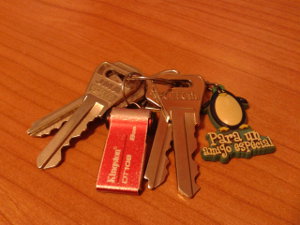
I always carry a debian-live system in my keyring, it is an image (built by myself using a git repository) that I installed in a USB pendrive.


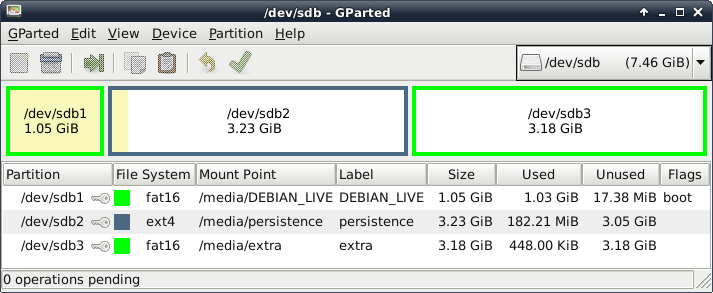
The device has three partitions. The first one contains the debian-live system itself, the second one is used for persistence and the third one is an extra fat16-formatted partition to copy and move files around easily. Here is the layout:


It is really handy to to be able to carry your operating system with you everywhere you go. You can boot it on almost any machine you have access to, saving your data in the pendrive. It is also a great tool to test hardware before performing an installation (the image includes an installer).

26 January 2013

Here comes the squid


I have added a new machine to my personal collection. Its hostname is squid following my naming convention. See my Profile for more information.
It has a 64-bit processor (athlon), 2GB of ram and two hard disks. It is a little bit old but it is really fast. Today I installed debian wheezy with the b4 installer. Everything went fine and smoothly.


Welcome to my network, squid :-p

28 December 2012

raspi at work


I must admit that I am really, really excited about my raspi (raspberry pi). I ordered it three months ago and during all this time I have spent a lot of time thinking about the endless possibilities that such an amazing piece of machinery could offer.
I have installed a lot of applications from the debian archive, perhaps the most outstanding ones are the servers: ssh, ftp, http and gopher.
In the screenshot you can see the result of:
 $ lynx gopher://localhost
and the moment of writing this post.


20 October 2012

Welcome xana


At the moment of writing this post, I'm installing debian sid in my new laptop. Its hostname is xana, this name makes perfect sense because sid is considered the bad boy and so is xana in the Code Lyoko series. I also added it to my profile.
It is a lenovo. I saw it at the computer store and I just couldn't resist. An impressive machine with an excellent price. Besides, I had been meaning to get one of these for a long time.


In order to install it I tried the Beta 3 netinstall 64 bits but it complained that it was unable to read the files from the installation media. I tried the same Beta 3 but for 32 bits and it worked like a breeze. The debian-installer defaults to wheezy so I have only installed the base system and when done, I have edited /etc/apt/sources.list to add:
 deb http://http.debian.net/debian/ sid main contrib non-free
And as usual apt-get update and apt-get dist-upgrade. Everything goes very fast if you have a good internet connection.
Now it has finished upgrading to sid, see? that was fast ;)
The final step for me is:
root@xana:/home/chals# apt-get install xfce4 && apt-get clean
And of course, I'll also have to install and configure other software like for example xfce4-goodies but I will have plenty of time tomorrow. It'll be Sunday and it is raining cats and dogs, so ...
Note: Do not think that I'm cheating because I have already published a picture when the graphical system is still not up and running. I booted the machine first using a debian-live usb stick to see if everything worked out of the box (in case I should need to load any firmware), but I didn't have to worry about that. Everything works just fine.


03 September 2012

RasPi


Yesterday I ordered my first Raspberry Pi. I say my first because ever since I discovered this cute little invention I said I'd (and I intend to) buy two. But for the time being, and also with the idea in mind of running some tests to see how it works and how many things I can do with it, I just bought one.
It is going to be powered by debian. I read there is a debian derivative called Raspbian which was especially designed to work with the RasPi. So I'll have to give it a try. Besides it is the recommended operating system by the Raspberry Pi Foundation.
But to tell you the truth, even though Raspbian might be ok to begin with, I will replace it by a pure debian installation. I do not need the graphical interface provided by Raspbian. I just need a basic debian system with some servers installed.
I intend to use the little RasPi as a micro server of several things, gopher, http, an irc bouncer... but who knows? I still need to see how far one can get with such a tiny machine. To begin with its low power consumption makes it ideal to run 24/7.
The downside is that it costs a little bit more than expected (even though this should be expected) It costs 27€ but once you have paid for the case, the power supply and the expenses you need to spend 52€ (more than that if you have to buy some extra stuff like cables, memory card...) but well, I think it is worth it. The worst thing is having to wait for 13 weeks until the order is processed plus one more week (own estimation) to arrive home.
Note: I'll publish some pictures when I finally get it.

26 August 2012

My live


I have been procrastinating for a couple of weeks but I couldn't wait anymore. Today I created a git repository to store an initial configuration to build a live system based on debian.
The idea sprang from a new feature offered by live-build one of the tools created and maintained by the Debian Live Project.
This config creates a very generic graphical desktop using xfce with some additional packages and a live-installer to install the contents of the live system. It also makes use of the persistence feature to store some files.
And as the description of the repository says, it is yet far from perfect, as it is pretty much unfinished. It is just an exercise to create an update for my live-server which will be available some time soon.
The repository is located at https://gitorious.org/mylive
In order to build the image, you only have to take three really easy steps:
 $ mkdir live-system && cd live-system
 $ lb config --config git://gitorious.org/mylive/mylive.git
 # lb build
More information can be found on the live-manual
Enjoy!

09 August 2012

debootstrap


If you have ever used a unix/linux system you probably know about the chroot command. I have several testing chroot directories in my debian systems but I had never really taken advantage of such a great tool as debootstrap is, at least consciously.

This week I installed sid in a chroot in wheezy and I'm really enjoying the fact that I can play with it as much as I need to without risking breaking things badly.

I heard (on the net) that lxc are even better. I quote:

  described as “chroot on steroids”


I once tried installing a container in wheezy but I didn't succeed, I'll try again at the weekend.

18 February 2012

Installing Wheezy on my eeepc 701

My eeepc 701 4G has been with me since 2008 each and every single day giving me the best of what it's got. No wonder I love it so much.

I have tested Wheezy on it for a whole week using a custom built debian-live image (without installer). It works flawlessly using full persistence. The only problem is that everytime I turn on the machine I have to reinstall Dropbox because it does not seem to work fine with cow (This is just a wild guess. The problem might be anything else.)

This afternoon I'm going to install Wheezy on a mini sd flash card of 16 GB I bought yesterday using the regular debian installer. The procedure is quite simple.

1.- Wipe grub from the master boot record of the usb stick I'm going to use as installation media. (This is just because I have been playing with siduction on that usb pendrive for a couple of days. It boots the iso using grub.)

  # dd if=/dev/null of=/dev/sdX bs=446 count=1 # X is the device letter
 
2.- Download the debian-testing-i386-netinst.iso (227M) and dd it to the pendrive:

   $ dd if=debian-testing-i386-netinst.iso of=/dev/sdX
 
3.- Boot the eeepc from the usb pendrive. Select expert install and there you go!!!

04 January 2012

To .deb or not to .deb, that's the question...

Hey, what did you expect? I'm a poet, not a coder ;)

This short blog post is just to inform you that I am writing a new tutorial on how to build a .deb package in just five minutes with equivs

03 January 2012

My first .deb

\o/ Today I built my first debian package or .deb

I wrote the source code of the package myself. You can find the main script here. It is a simple script to archive phlog (gopher blog) posts on a yearly basis. I called it pharc which stands for phlog archiver. It is based on the mkphlog script, written by octotep, that I use to build my own phlog

It takes a little bit of work, then

    $ debuild -us -uc

And voilà! you can find the package here:

pharc 1.0-1 all.deb

Important: This package was built for learning purposes only. It has some limitations I am perfectly aware of. Just to name a few:
  • The script assumes that you have a link in your $HOME/gopher to your gopher server. And that all your posts are in directories named $(date +%m-%d-%y)
  • The makefile is ridiculous. It only has seven lines! I wrote it in 25 seconds just to experience quick success. Now if you're really curious I can paste it here or somewhere else.
  • The complete list of files is not available online. They are stored on my server but if you want them you can ask for them. Here is the list:

    pharc_1.0.orig.tar.gz
    pharc_1.0-1_i386.changes
    pharc_1.0-1_i386.build
    pharc_1.0-1_all.deb
    pharc_1.0-1.dsc
    pharc_1.0-1.diff.gz
  • Who uses gopher or keeps a phlog anyway?