The last time I remember talking on this blog about the Debian Live project was when I installed Squeeze on my eeepc 701 4G.
But I'm pretty sure I have made references to the project a thousand times. It's a project I have followed from the very beginning and one which I really love. If I am not mistaken, now I'm just trying to recall from the past, the project was initiated by the live team led by Daniel Baumann after everybody out there was building debian-based live images without any official release available anywhere. Debian live came through to fill that empty space. The project has now produced stable releases out of Lenny and Squeeze. (There were no official releases of Etch) and at the time of writing this they are working on the production of live images of Wheezy. There is a daily, weekly and monthly build on the project website. There you can also find an online cgi builder to tailor the images to your liking.
One important thing to notice is that the project is geared towards helping users to create their own images as the team members focus on developement rather than simply providing pre-built images. Although they produce those images for practical reasons.
On http://live.debian.net/ you can also find links to different sections of development. Among them all I would like to point out the live-manual as I happen to be translating it into Spanish (Together with a partner)
In the manual you'll find everything explained in detail. But here are some of the reasons why I personally love debian live:
- Gives you the tools to build custom images and shows you how to use them.
- It is useful to test hardware. Images can be installed on different media from cds to usb sticks. You can boot them from the media without having to install anything on the hard drive. (You can save changes if you want to, using persistence)
- It is very handy as a rescue tool (That I can assure you)
- You can now use it to install Debian on eeepc's. You will definitely then need to check out the debian-eeepc project led by Ben Armstrong. I'll tell you about it on another occasion. It's gonna be soon.
25 February 2011
06 February 2011
Installation of Squeeze
As I told you yesterday. Debian 6.0.0 code name Squeeze has been released today. I had already installed it on my laptops but not yet on my desktops. Today I have installed it on Odd. F.hopper will have to wait for some time until I have some afternoon free.
I've had some issues, but they were of little or of no importance at all. The strangest one was that the installer didn't install gnome. I had to manually do it later on the terminal after the installation had finished. Other things were related to the fact that new software has new features and I still have to get used to some of these changes.
Well, evolution does not work properly. It didn't work after freeze either. I suppose the team will provide a fix soon.
Well it's a bit late now. I'll tell you more on another occasion.
I've had some issues, but they were of little or of no importance at all. The strangest one was that the installer didn't install gnome. I had to manually do it later on the terminal after the installation had finished. Other things were related to the fact that new software has new features and I still have to get used to some of these changes.
Well, evolution does not work properly. It didn't work after freeze either. I suppose the team will provide a fix soon.
Well it's a bit late now. I'll tell you more on another occasion.

05 February 2011
Squeeze released!!!
This is going to be a very special weekend because Debian 6.0 codenamed Squeeze is going to be released if everything goes as scheduled. The release notes are going to be published today or maybe tomorrow. We have to keep in mind that the official announcement will probably come from the USA and that their time zone has a difference between 3-8 hours to GMT. I am at +1. There can be a delay of several hours.
Congratulations to all Debian project members and volunteers from around the world. I will keep watch all day for this important moment to arrive.
Congratulations to all Debian project members and volunteers from around the world. I will keep watch all day for this important moment to arrive.
21 January 2011
My SpongeBob collection
 Some years ago I showed you my collection of penguins of Madagascar.
 Now here is, even if it is not finished, my SpongeBob collection (Thanks to a very dear friend of mine)
So far we've got Mr. Krabs, SpongeBob and Squidward.
16 January 2011
Home Network
I created my home network in 2005 when I bought Aelita. That was 6 years ago. I remember the first time that I could print from the laptop using samba. It was a great experience. Then came other network services: Telnet, ssh, ftp, vnc ... Wow!!! It's hard to recall them all.
But throughout these years I thought that my machines were just that, a battery of hard workers performing a job. I had never had the feeling that every computer attached to my network was what they actually are: A perfect piece of the puzzle. Now I can clearly see that they have all become a powerful group of soldiers forming an army. After some time it does not matter what computer I'm sitting at. From one to another I can perform the same day to day tasks and retrieve any files or whatever I need. Especially since I installed the ftp server.
No need to say that the power of Debian GNU/Linux has helped me a lot. It provides all the necessary tools to build up such a wonderful home network as the one I'm so proud of.
But throughout these years I thought that my machines were just that, a battery of hard workers performing a job. I had never had the feeling that every computer attached to my network was what they actually are: A perfect piece of the puzzle. Now I can clearly see that they have all become a powerful group of soldiers forming an army. After some time it does not matter what computer I'm sitting at. From one to another I can perform the same day to day tasks and retrieve any files or whatever I need. Especially since I installed the ftp server.
No need to say that the power of Debian GNU/Linux has helped me a lot. It provides all the necessary tools to build up such a wonderful home network as the one I'm so proud of.
06 January 2011

Things I've done this week.
The Magi have brought presents and also new things to do. Not following any special order ...
- Now I can say I can really surf the net with my Alcatel X060 usb modem (Simyo). I do not use it much because I have an awesome wireless lan connection. I only use the modem to read mail when I'm not home. So far the speed was of 45-50 kbps. There was just no way of loading webpages. But now with 3G networks I get speeds of 2000 kbps. Not bad at all. Here is a speed test: (By the way, it works great in linux with network-manager.)
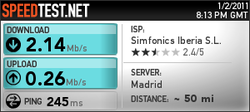
- Now I can say I can really surf the net with my Alcatel X060 usb modem (Simyo). I do not use it much because I have an awesome wireless lan connection. I only use the modem to read mail when I'm not home. So far the speed was of 45-50 kbps. There was just no way of loading webpages. But now with 3G networks I get speeds of 2000 kbps. Not bad at all. Here is a speed test: (By the way, it works great in linux with network-manager.)
- I have improved the installation of Squeeze in the eeepc. I have plugged in a usb pendrive and have made two partitions there. One mounted as /home and another one as swap. This way I have more space left for the root filesystem. This afternoon I'll configure evolution and I think that will be all for the moment. Yesterday I installed Radiotray which is an awesome program to listen to the radio with just one click. I listen to Radio Paradise and Absolute Radio Classic Rock.
- I have also installed a SATA controller in the main server with a hard disk of 500 GB. It adds extra "needless" storage but it is ok. The only problem is that the bios is not capable of booting from that drive. Too bad. I may find a way to do it someday.

TODO:
- Install Squeeze on my desktop machines.
- Buy present for my nephew's birthday.
- Configure evolution on eeepc.
- Send mail.
- I have also installed a SATA controller in the main server with a hard disk of 500 GB. It adds extra "needless" storage but it is ok. The only problem is that the bios is not capable of booting from that drive. Too bad. I may find a way to do it someday.
- I have also been fighting hard trying to organize the mess of cables behind the computer's desk but there was just no way. I've done my best though.

TODO:
- Install Squeeze on my desktop machines.
- Buy present for my nephew's birthday.
- Configure evolution on eeepc.
- Send mail.
Subscribe to:
Posts (Atom)