I was in doubt because a friend of mine recommended blackberry for it is supposed to be best suited for email. No wonder because It has a real keyboard.
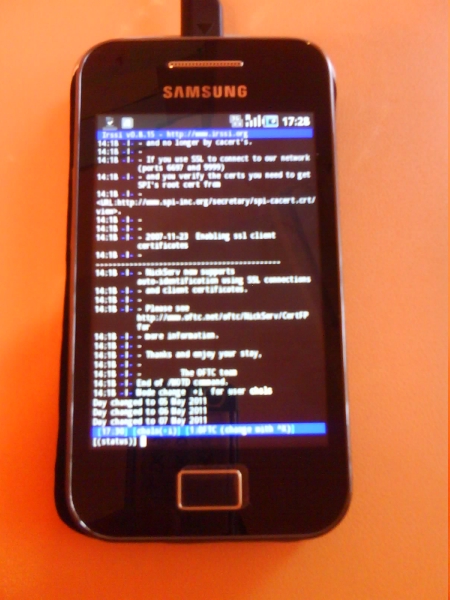
But the fact that android uses a linux kernel weighed way to much for me to resist. And finally here it is. This great android based mobile phone.
Well, to tell you the truth what makes this phone really outstanding are the applications you can install. I only needed two so it was fast:
1st.- Irssi ConnectBot a ssh client modified to use irssi (You can see it at work in the picture)
https://market.android.com/details?id=org.woltage.irssiconnectbot&feature=search_result
2nd.- AndFTP a FTP/SFTP client (To connect to my server)
https://market.android.com/details?id=lysesoft.andftp&feature=search_result
I also configured the phone to use my email account and that's it. Now I can follow my motto of the month: "Always connected means always connected"
I suppose in time I'll end up installing a million apps like for example Dropbox and other utilities but I'm content by now. It can even make phone calls
08 May 2011
03 May 2011
A "real" linux guru? nah, no way
This week my "ugly face" anecdotically appears on the home page of linux.com
Here is the proof:
The story goes that I published a tutorial/article about how to create a debian live usb. The tutorial was first published on my website but since not many people visit my site I decided to send it there.
I can't write code but I sure can write documentation or at least I try to do it as accurately as I can.
Besides, sharing a little knowledge is good.
Here is the proof:
The story goes that I published a tutorial/article about how to create a debian live usb. The tutorial was first published on my website but since not many people visit my site I decided to send it there.
I can't write code but I sure can write documentation or at least I try to do it as accurately as I can.
Besides, sharing a little knowledge is good.
02 May 2011
haiku (BeOS replacement)
This week I finally fulfilled one of my "easy-to-achieve" dreams of long ago which consisted in trying BeOS (discontinued since 2001) or almost.
The story goes back to 2004-2005 when I spent long hours reading and thus learning about operating systems. I read Neal Stephenson's In the beginning ... was the command line He enhances linux (of course) but makes a special praise of BeOS. I wanted to try it ever since then but unfortunately I never got the chance to do that.
On my quest for BeOS I heard about Haiku but at first I looked down on it as being a mere second hand imitation of the real thing. However now that I finally decided to try it I must admit how wrong I was. Haiku is a really good operating system. Nice and clean user interface focused on usability and simplicity but stuffed with a bunch of really useful and easy to use software. Besides it is free and open source and has a powerful terminal
You can download it in three formats: anyboot (images for usb devices), iso (for cd's) or VM (images for virtual machines). At the moment of writing this it is in alpha 2 state but I found it very stable. It woks great. I have not installed it on a hard disk but tried it with qemu and with a live cd as well.
One more to my list ... of favourites.
The story goes back to 2004-2005 when I spent long hours reading and thus learning about operating systems. I read Neal Stephenson's In the beginning ... was the command line He enhances linux (of course) but makes a special praise of BeOS. I wanted to try it ever since then but unfortunately I never got the chance to do that.
On my quest for BeOS I heard about Haiku but at first I looked down on it as being a mere second hand imitation of the real thing. However now that I finally decided to try it I must admit how wrong I was. Haiku is a really good operating system. Nice and clean user interface focused on usability and simplicity but stuffed with a bunch of really useful and easy to use software. Besides it is free and open source and has a powerful terminal
You can download it in three formats: anyboot (images for usb devices), iso (for cd's) or VM (images for virtual machines). At the moment of writing this it is in alpha 2 state but I found it very stable. It woks great. I have not installed it on a hard disk but tried it with qemu and with a live cd as well.
One more to my list ... of favourites.
01 May 2011
Computers: "I choose freedom"
This is part of a speech I wrote about computer freedom and free software. I think I read a similar comparison somewhere but I like to think that I made it all up by myself.
"Imagine you have recently bought a brand new bicycle for your little child (I find a little girl to be more heart-touching, that's why I refer to the child as "she"). She is very excited about the coming of spring because she'll be able to ride her shiny bike. On Sunday you're all ready to go to the park but then you find the bike has got a flat. No problem you say. I've got an old rusty pump in the garage, it's a just a matter of finding it. However when you are about to pump air into the wheel someone suddenly warns that you just can't do it because when you got the bicycle you signed a legal contract saying that you are not allowed to do that under any circumstances. You must take it to the technician who's the only person authorized to do that.
You will probably wonder: What? Why can't I?
Well, to a certain extent (and with several nuances) this is similar to what happens when you buy a computer with a legacy operating system. You own the machine because you have a ticket to prove that, but even if you have a ticket from the store for your legacy operating system you just can't say it is yours because in order to be able to use the software you are forced to accept certain terms that specifically say that you have the right to use the software but you just can't manipulate the source code to suit it to your own personal needs.
That's where free software comes in ...
...
Since I chose free software I chose freedom and now I can finally pump fresh air into my computer."
"Imagine you have recently bought a brand new bicycle for your little child (I find a little girl to be more heart-touching, that's why I refer to the child as "she"). She is very excited about the coming of spring because she'll be able to ride her shiny bike. On Sunday you're all ready to go to the park but then you find the bike has got a flat. No problem you say. I've got an old rusty pump in the garage, it's a just a matter of finding it. However when you are about to pump air into the wheel someone suddenly warns that you just can't do it because when you got the bicycle you signed a legal contract saying that you are not allowed to do that under any circumstances. You must take it to the technician who's the only person authorized to do that.
You will probably wonder: What? Why can't I?
Well, to a certain extent (and with several nuances) this is similar to what happens when you buy a computer with a legacy operating system. You own the machine because you have a ticket to prove that, but even if you have a ticket from the store for your legacy operating system you just can't say it is yours because in order to be able to use the software you are forced to accept certain terms that specifically say that you have the right to use the software but you just can't manipulate the source code to suit it to your own personal needs.
That's where free software comes in ...
...
Since I chose free software I chose freedom and now I can finally pump fresh air into my computer."
28 April 2011
Trying gnome-blog
Today I have upgraded aelita to debian testing.
And using synaptic I have found this very nice application called gnome-blog. It's easy to use and really handy.
I'm giving it a try to see how it works. I suppose it must be something similar to mail2blogger
And using synaptic I have found this very nice application called gnome-blog. It's easy to use and really handy.
I'm giving it a try to see how it works. I suppose it must be something similar to mail2blogger
25 April 2011
ftpbackup
This is a shell script I use to backup my home folder to a remote server. It uses lftp and it was written using a here document.
I got the inspiration from an article at linux.com and I improved it
I must tell you that this script is used to upload data to a remote directory but it also erases everything contained there. Do not use the -e option if you do not wish to delete anything.
# Script to backup an entire /home/< user > directory with lftp. Neat and clean. No sweat.
# Simply replace < whatever > with your own data. That's it.
###### BE WARNED!!! Option -e erases all the data on the target directory########
######DO NOT USE IT if you want to keep all the data there####################
#!/bin/bash
lftp << EOF > /dev/null 2>&1
open -u < username >,< password > -p 21 < serveraddress >
mirror -c -e -R /home/< user > < /path/to/remotedirectory >
exit
EOF
I got the inspiration from an article at linux.com and I improved it
I must tell you that this script is used to upload data to a remote directory but it also erases everything contained there. Do not use the -e option if you do not wish to delete anything.
# Script to backup an entire /home/< user > directory with lftp. Neat and clean. No sweat.
# Simply replace < whatever > with your own data. That's it.
###### BE WARNED!!! Option -e erases all the data on the target directory########
######DO NOT USE IT if you want to keep all the data there####################
#!/bin/bash
lftp << EOF > /dev/null 2>&1
open -u < username >,< password > -p 21 < serveraddress >
mirror -c -e -R /home/< user > < /path/to/remotedirectory >
exit
EOF
24 April 2011
Invaluable CLI software I just can't do without
When I started using computers at school (a long time ago) there weren't any graphical user interfaces available. Everything was done typing commands at the terminal. When I tell younger people about it they just can't believe it. Sometimes they see me typing strange words in a strange little black window with green letters (yes, I'm a bit nostalgic) and they wonder if I am gone nuts or something. Telling them that that was the usual thing long ago doesn't impress them much. Telling them there weren't mice with pointers to click on icons is something they just can't figure out.
Well, I like using the CLI sometimes but on the average I spend most of my time on the GUI. It's all about getting used to it. And the eye candy counts. But now that I finally own a network server I need to revisit the software of the good old days. (For your information: Some of the software I'm going to describe right now is newer than the software I was refering to above. It's just a rhetorical license)
Although it is attached to a local network, I do not have physical access to my server. I handle it remotely using ssh. I tried telnet at first because there are no security risks here. And telnet works just fine but it does not have scp nor sftp which are great.
Let me first make a list of the software I use; and then little by little I'll try to add more information:
Must-have (on a network server)
-httpd server (namely apache2)
-ftp server (namely proftpd-basic)
-nfs server (nfs-kernel-server)
-Remote control utility (telnetd or ssh)
-top and apachetop (cpu and server monitoring tools)
-wakeonlan (on the local machines) and shutdown (on the remote server) A server is supposed to be up and running 24/7. However a reboot is necessary sometimes. If you halt (-h) it instead of rebooting (-r) you definitely need wakeonlan.
Handy file manager
-mc (the good old midnight commander)
-This-is-not-a-file-manager but I didn't know where to make this absolute gem fit: screen a multiplexing terminal program. A must-have of remote administration. I personally use tmux because it has some features that I prefer like for example: splitting buffers vertically.
Useful utilities (in no particular order)
-aptitude (package manager. You can use apt-get too)
-elinks (full featured web browser)
-mutt (email client) You will definitely need fetchmail as well. In order to learn how to configure fetchmail you can go here
-In order to communicate with the outside world (apart form simple email exchange) I use centerim (im) and irssi (irc)
-calcurse I mainly use it as a todo list utility.
-wget (retrieves any file over the net)
-I like gftp-text but the ftp program is ok.
-nano or vim (text editors) Although you can also use mc's internal editor
-cmatrix (Awesome)
Last but not least just remind you that many of the programs that you use at the GUI either have a CLI counterpart or can be managed from the command line. Some good examples are gftp (gftp-text) or mplayer (mplayer-nogui).
mplayer can also play videos/films in ascii using the libcaca library (In Debian caca-utils comes with cacaview, cacafire and cacademo). Try this:
Well, I like using the CLI sometimes but on the average I spend most of my time on the GUI. It's all about getting used to it. And the eye candy counts. But now that I finally own a network server I need to revisit the software of the good old days. (For your information: Some of the software I'm going to describe right now is newer than the software I was refering to above. It's just a rhetorical license)
Although it is attached to a local network, I do not have physical access to my server. I handle it remotely using ssh. I tried telnet at first because there are no security risks here. And telnet works just fine but it does not have scp nor sftp which are great.
Let me first make a list of the software I use; and then little by little I'll try to add more information:
Must-have (on a network server)
-httpd server (namely apache2)
-ftp server (namely proftpd-basic)
-nfs server (nfs-kernel-server)
-Remote control utility (telnetd or ssh)
-top and apachetop (cpu and server monitoring tools)
-wakeonlan (on the local machines) and shutdown (on the remote server) A server is supposed to be up and running 24/7. However a reboot is necessary sometimes. If you halt (-h) it instead of rebooting (-r) you definitely need wakeonlan.
Handy file manager
-mc (the good old midnight commander)
-This-is-not-a-file-manager but I didn't know where to make this absolute gem fit: screen a multiplexing terminal program. A must-have of remote administration. I personally use tmux because it has some features that I prefer like for example: splitting buffers vertically.
Useful utilities (in no particular order)
-aptitude (package manager. You can use apt-get too)
-elinks (full featured web browser)
-mutt (email client) You will definitely need fetchmail as well. In order to learn how to configure fetchmail you can go here
-In order to communicate with the outside world (apart form simple email exchange) I use centerim (im) and irssi (irc)
-calcurse I mainly use it as a todo list utility.
-wget (retrieves any file over the net)
-I like gftp-text but the ftp program is ok.
-nano or vim (text editors) Although you can also use mc's internal editor
-cmatrix (Awesome)
Last but not least just remind you that many of the programs that you use at the GUI either have a CLI counterpart or can be managed from the command line. Some good examples are gftp (gftp-text) or mplayer (mplayer-nogui).
mplayer can also play videos/films in ascii using the libcaca library (In Debian caca-utils comes with cacaview, cacafire and cacademo). Try this:
$ mplayer -vo caca <file> Or this:$ cacaview <file> Another recent discovery is nvlc a full featured ncurses interface for vlc
Subscribe to:
Posts (Atom)

